
Customer portal
Your customers see their invoices, statement and payments, with no password to remember.
14 features in 3 groups. Included in Starter, Business, Professional, Enterprise and Business (founding rate)
Customers call to ask for a copy of an invoice or their balance, and your team stops to answer each time.
With Customer portal
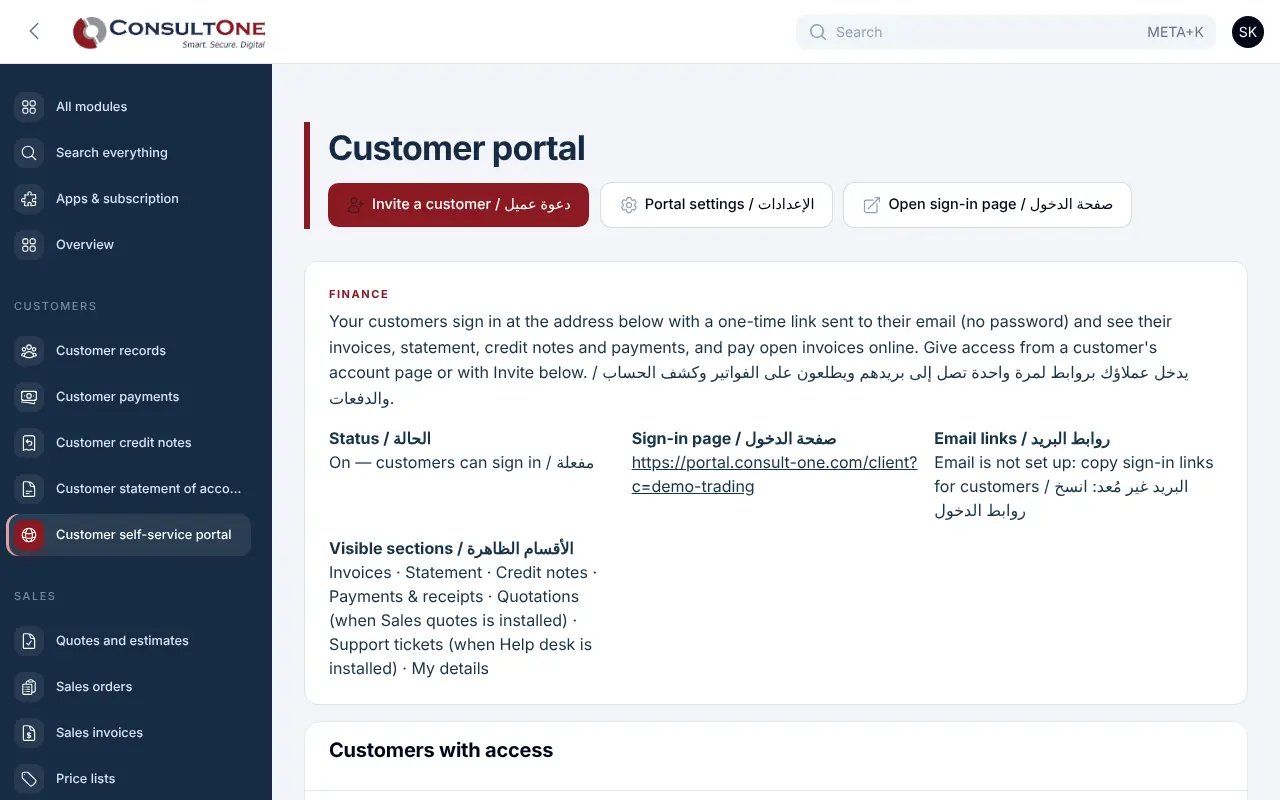
Invite the people at a Finance customer by email. They sign in with a one-time link and see what they owe and what they have paid, print their statement, follow their quotes and support tickets, and ask you to update their details. Each customer only ever sees their own account.
Group 1 of 3, 4 features
Sign-in
- One-time email link, valid for 15 minutes and usable once; no passwords
- An email used by several of your customers, or by several companies, chooses which account to open
- Session ends after 30 minutes without activity and after 8 hours at most
- English and Arabic, made for phones
Group 2 of 3, 5 features
What your customers see
- Overview: balance due, overdue amount, open invoices and latest payments
- Invoices with a link to view and pay; card payment when your gateway is set up
- Statement by currency and period, ready to print or save as PDF
- Credit notes, payments and receipts
- Quotations, when you use Sales, and support tickets, when you use the Helpdesk
Group 3 of 3, 5 features
What you control
- Switch customer sign-in on or off and choose the sections they see
- Welcome text in English and Arabic
- Invite people per customer, copy a sign-in link, disable access
- Change requests for contact details come to you to review
- A log of sign-ins and requests
How it works
- 1
Switch it on
Choose the sections and write a welcome.
- 2
Invite your customers
Pick the Finance customer and add their people.
- 3
They sign in by email
A one-time link opens their own account.
Works with
Apps it connects with inside the Portal. Each has its own presentation.
- Finance & AccountingInvoicing to financial statements, built for Jordan and the Gulf.
- Sales: quotes & ordersQuotes your customers accept online, and orders you invoice in full or in parts.
- Helpdesk & Help CentreSupport tickets with targets, and a help centre that answers first.
- Payment GatewayCard payments for invoices and websites.
Settings and security
Settings you control
- Customer sign-in on or off
- Visible sections
- Welcome text
- Managed by owners and administrators
Your data stays your company's
- Every company has its own separate books that no other company can see.
- Two-step sign-in is required for owners and administrators.
- Access by role: owner, administrator, accountant, staff, read only.
Plans that include it
Plans that include this app are marked. Every self-service plan starts with a 14-day free trial.
Starter
Includes this app- Finance & Accounting
- E-invoicing
- Sales: quotes & orders
- CRM & Contacts
- HR & Payroll
- Customer portal
- Reports & Dashboards
- Up to 2 users
Business
Includes this app- Everything in Starter, plus:
- Inventory, POS & Store
- Projects & timesheets
- Helpdesk & Help Centre
- Appointments
- Document signing
- Up to 5 users
Professional
Includes this app- Finance & Accounting
- E-invoicing
- Sales: quotes & orders
- CRM & Contacts
- HR & Payroll
- Inventory, POS & Store
- Projects & timesheets
- Helpdesk & Help Centre
- Document signing
- Customer portal
- Reports & Dashboards
- Automation & API
- Up to 15 users
Enterprise
Includes this app- Everything in Professional, plus:
- Appointments
- No limit on users
Business (founding rate)
Includes this app- Finance & Accounting
- E-invoicing
- Sales: quotes & orders
- CRM & Contacts
- HR & Payroll
- Inventory, POS & Store
- Projects & timesheets
- Helpdesk & Help Centre
- Customer portal
- Reports & Dashboards
- Automation & API
- Up to 10 users
Prices in Jordanian dinars per month.
Questions before you start
Do my customers need a password?
No. They enter their email and get a one-time sign-in link valid for 15 minutes.
Can a customer change their details?
They send a change request; you review it and update the customer record.
Open your workspace today
14-day free trial, no card needed. Two-step sign-in is on from day one.