
CRM & Contacts
Every customer conversation, deal and follow-up in one place.
29 features in 7 groups. Included in Starter, Business, Professional, Enterprise and Business (founding rate)
Customer history lives in personal inboxes and phones. When someone is away, the follow-up is lost with them.
With CRM & Contacts
Keep your people and organisations, the deals you are working on and the next step for each of them. Leads from your website land here automatically, and a won customer becomes a Finance customer in one click.
Group 1 of 7, 5 features
Contacts and organisations
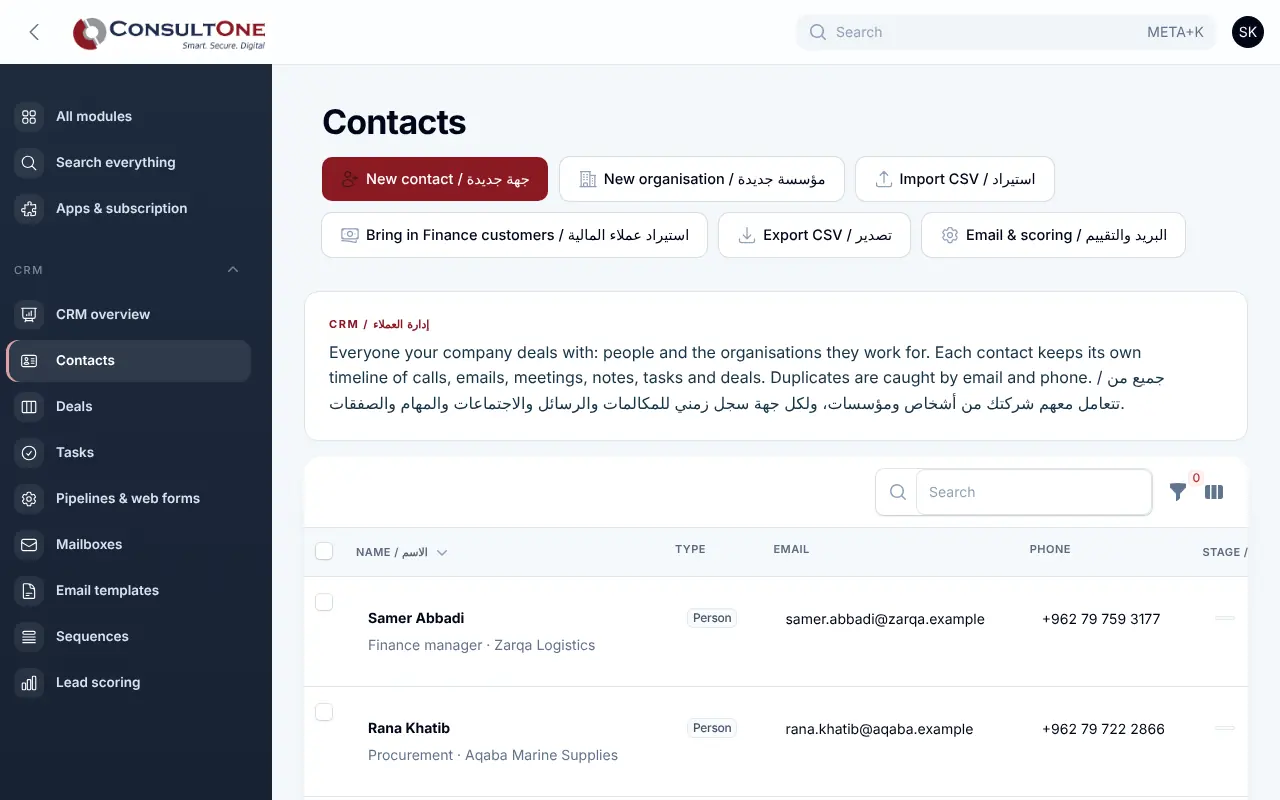
- People and the organisations they work for, with job title, email, phone, mobile and WhatsApp
- Lifecycle stage: lead, prospect, customer, partner, inactive
- Owner for every contact, tags, source and marketing consent
- Duplicates caught by email and by phone in any format
- Search, filters by stage, owner, source and tag; bulk assign, tag and archive
Group 2 of 7, 4 features
Timeline and follow-ups
- Log calls, emails, meetings, WhatsApp chats and notes on each contact
- Tasks with due dates and owners; overdue tasks stand out
- An organisation shows the activity of all its people and deals
- Every stage change is recorded automatically
Group 3 of 7, 4 features
Deals pipeline
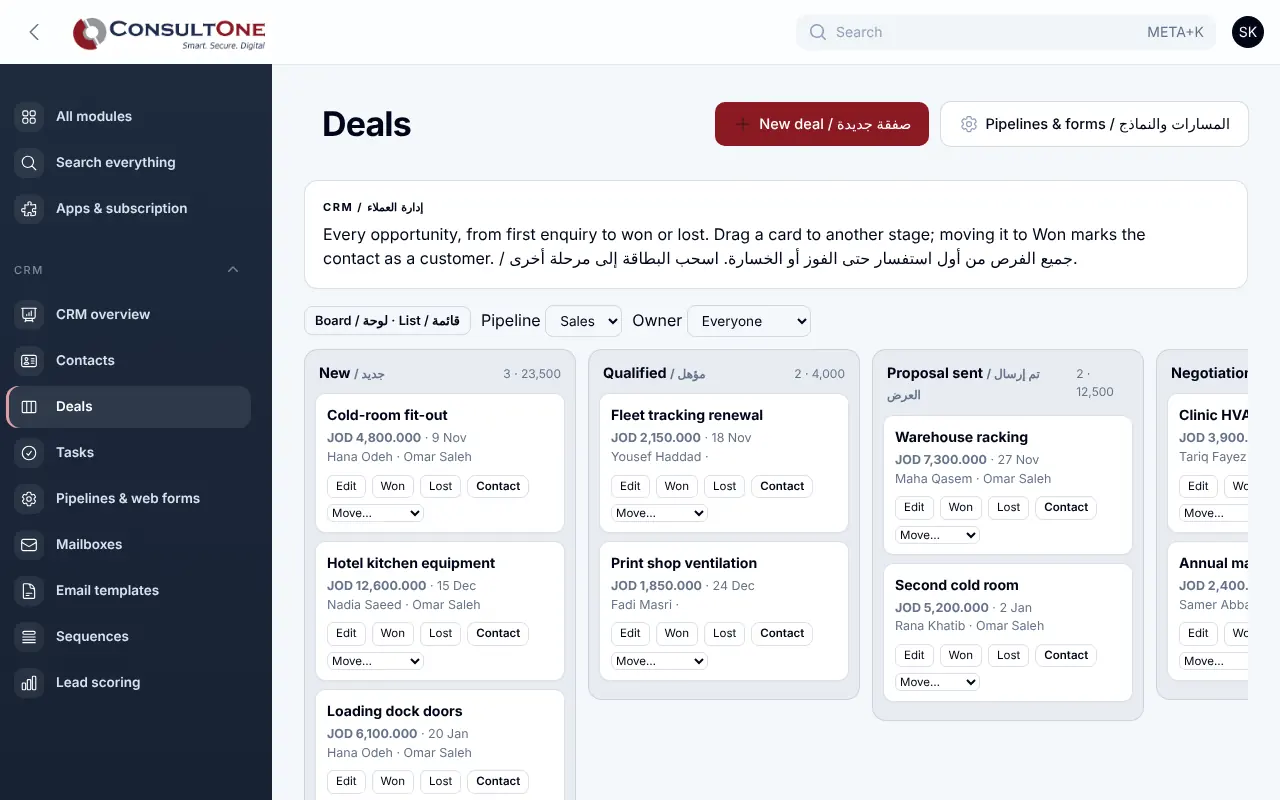
- Drag-and-drop board by stage, or a sortable list
- Value, currency, expected close date and owner per deal
- Won closes the deal and marks the contact a customer; Lost asks for the reason
- Several pipelines with your own stages and win chances
Group 4 of 7, 6 features
Email, sequences and calendar
- Email a contact from the CRM through your sales mailbox (SMTP or Microsoft 365), with templates, placeholders and attachments
- Without a sales mailbox, CRM email goes out from your company sender (Company settings → Email sending), so customers reply to your own address
- Opens and clicks tracked; replies come back onto the contact's timeline
- Email sequences with delays in days, optionally stopping when the contact replies
- WhatsApp click-to-chat from a contact, logged on the timeline
- Connect your Google or Microsoft 365 calendar to your CRM meetings and tasks
Group 5 of 7, 2 features
Lead scoring
- Points for source, lifecycle stage, email opens, clicks and replies, form submissions and deal value
- Your own scoring rules; contacts sorted and filtered as hot, warm or cold
Group 6 of 7, 4 features
Leads from your website
- Web forms you paste into any website, or a hosted form page to share
- Each enquiry creates the lead, its organisation, an optional deal and a reply task
- Spam trap, rate limits and an optional "only from my site" rule
- Email alert for each enquiry
Group 7 of 7, 4 features
Reports and data
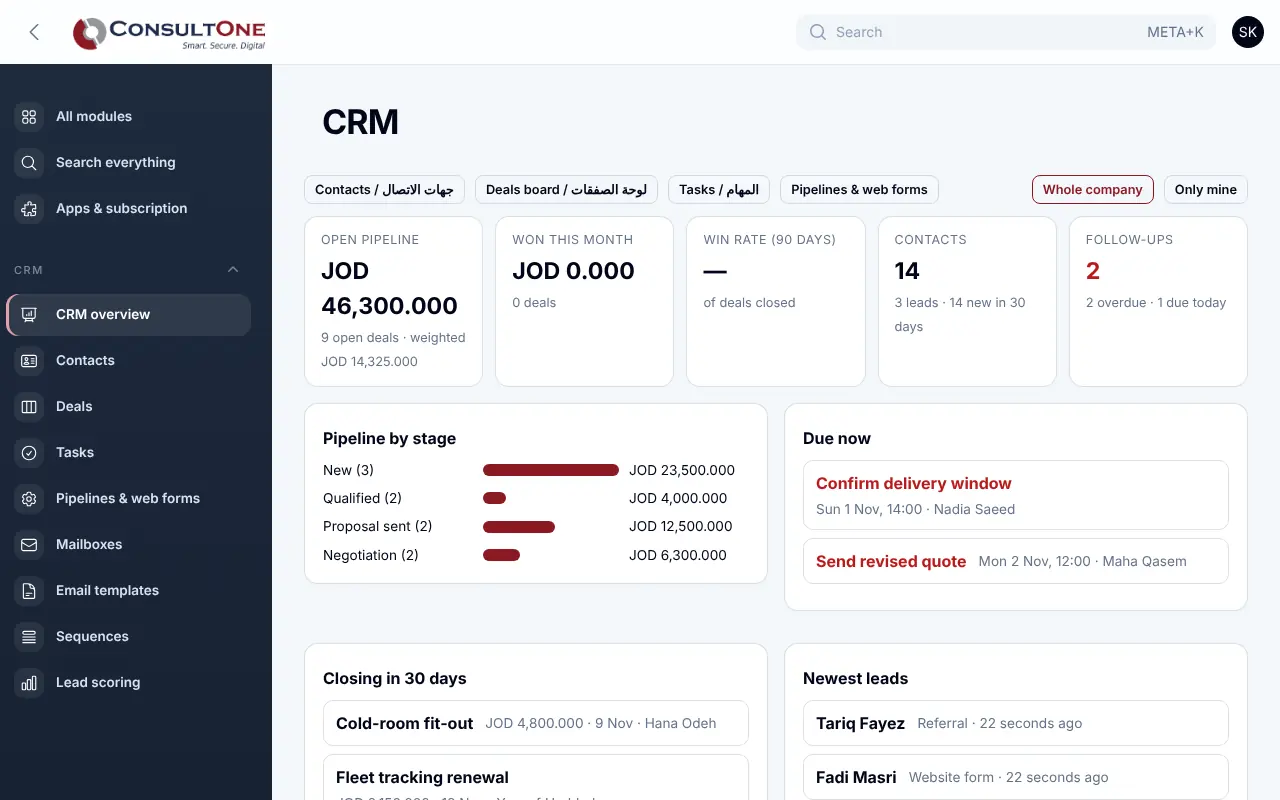
- Open pipeline, weighted value, won this month and 90-day win rate
- Whole company or "only mine" view
- CSV import with English or Arabic headers; Excel-safe CSV export
- Bring in all your Finance customers in one step
How it works
- 1
Add or import contacts
Type them in, upload a CSV, or bring in your Finance customers.
- 2
Put a form on your website
Copy the code once; every enquiry becomes a lead with a task.
- 3
Work the pipeline
Drag deals forward, log each call and meeting, never miss a follow-up.
- 4
Invoice the win
Turn the contact into a Finance customer and send the invoice.
Works with
Apps it connects with inside the Portal. Each has its own presentation.
- Finance & AccountingInvoicing to financial statements, built for Jordan and the Gulf.
- Sales: quotes & ordersQuotes your customers accept online, and orders you invoice in full or in parts.
- Projects & timesheetsPlan the work, log the hours and invoice the time.
- Automation & APIRules that act on your data, signed webhooks and a REST API for your own systems.
- Mailing & CampaignsCampaigns from your own mailbox, with consent built in.
- WhatsApp BusinessYour WhatsApp Business number inside the Portal.
Settings and security
Settings you control
- Pipelines and stages with win chances
- Web forms: owner, deal, alert email, allowed website
- Who can edit: owners, administrators and staff; accountants read only
Your data stays your company's
- Every company has its own separate books that no other company can see.
- Two-step sign-in is required for owners and administrators.
- Access by role: owner, administrator, accountant, staff, read only.
Plans that include it
Plans that include this app are marked. Every self-service plan starts with a 14-day free trial.
Starter
Includes this app- Finance & Accounting
- E-invoicing
- Sales: quotes & orders
- CRM & Contacts
- HR & Payroll
- Customer portal
- Reports & Dashboards
- Up to 2 users
Business
Includes this app- Everything in Starter, plus:
- Inventory, POS & Store
- Projects & timesheets
- Helpdesk & Help Centre
- Appointments
- Document signing
- Up to 5 users
Professional
Includes this app- Finance & Accounting
- E-invoicing
- Sales: quotes & orders
- CRM & Contacts
- HR & Payroll
- Inventory, POS & Store
- Projects & timesheets
- Helpdesk & Help Centre
- Document signing
- Customer portal
- Reports & Dashboards
- Automation & API
- Up to 15 users
Enterprise
Includes this app- Everything in Professional, plus:
- Appointments
- No limit on users
Business (founding rate)
Includes this app- Finance & Accounting
- E-invoicing
- Sales: quotes & orders
- CRM & Contacts
- HR & Payroll
- Inventory, POS & Store
- Projects & timesheets
- Helpdesk & Help Centre
- Customer portal
- Reports & Dashboards
- Automation & API
- Up to 10 users
Prices in Jordanian dinars per month.
Questions before you start
Is my CRM data separate from other companies?
Yes. Contacts, deals and activities live in your company's own books, which no other company can open.
Can I import from Excel?
Save the sheet as CSV and upload it. Matching emails or phones update the existing contact instead of creating a duplicate.
Do I need a developer for the web form?
No. Paste the HTML into your page builder, or simply link to the hosted form page.
Open your workspace today
14-day free trial, no card needed. Two-step sign-in is on from day one.