
Projects & timesheets
Plan the work, log the hours and invoice the time.
13 features in 4 groups. Included in Business, Professional, Enterprise and Business (founding rate)
Hours are logged late or not at all, budgets are checked after they are spent, and billable time is forgotten.
With Projects & timesheets
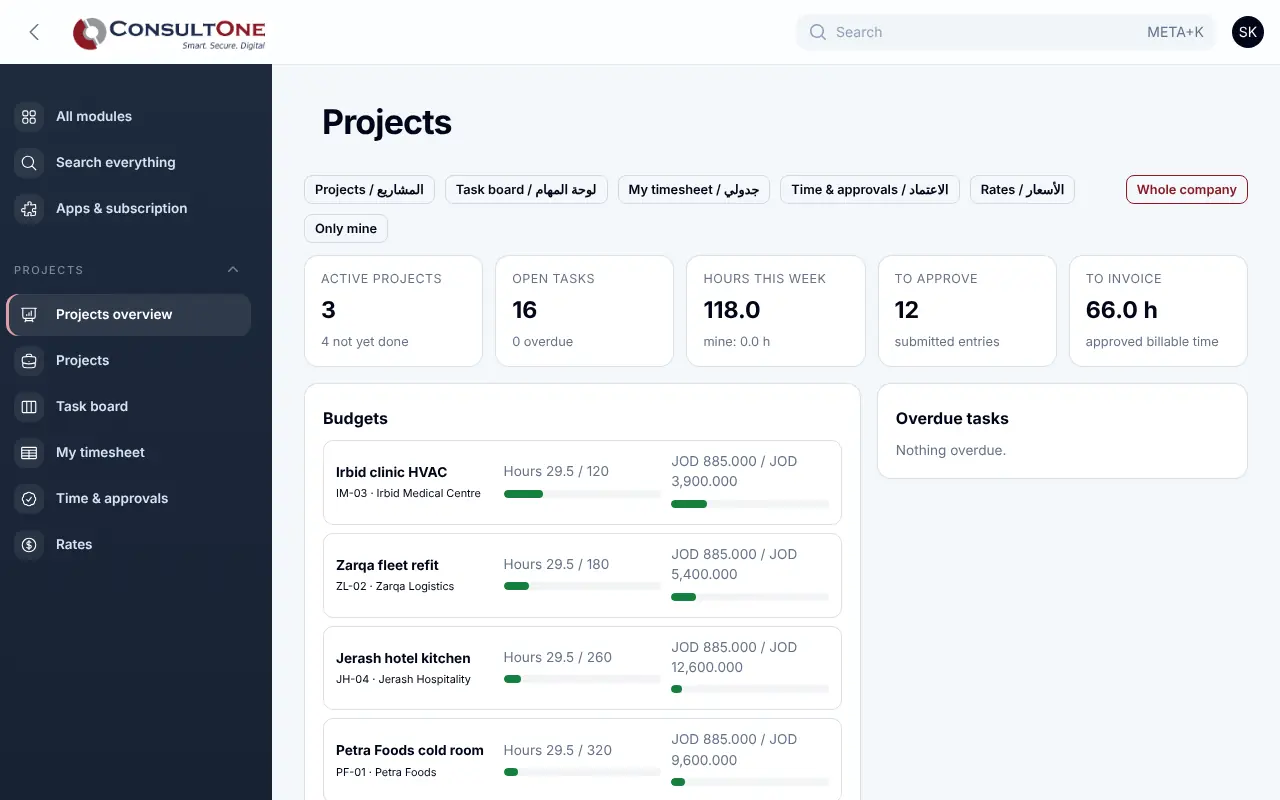
Run client and internal projects with a task board, milestones and a budget in hours and money. Your team fills in a weekly timesheet, the project manager approves it, and approved billable time becomes a Finance invoice in one step, never billed twice.
Group 1 of 4, 4 features
Projects
- Customer from Finance or the CRM, manager, dates and status: planned, active, on hold, done or cancelled
- Time and materials, fixed price or non-billable
- Budget in hours and in money, with hourly rate and currency
- Bill and cost rates per person, for one project or as the default
Group 2 of 4, 3 features
Tasks and milestones
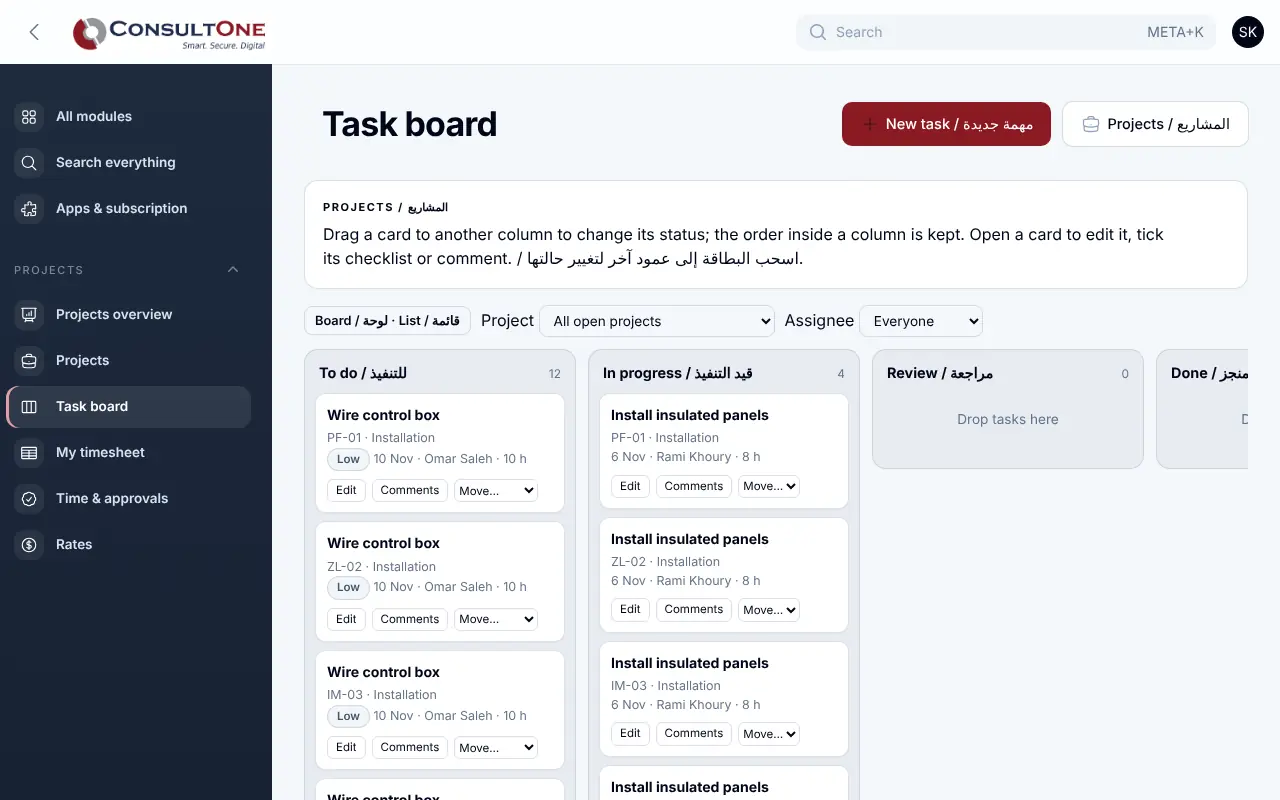
- Drag-and-drop board: to do, in progress, review, done
- Assignee, due date, priority, estimated hours, checklist and comments on each task
- Milestones with due dates, ticked off as they are reached
Group 3 of 4, 3 features
Time
- Weekly timesheet grid for each person, or single time entries
- Each entry with its task, a billable flag and a note
- Submit the week; the manager approves it or rejects it with a reason
Group 4 of 4, 3 features
Budgets and invoicing
- Invoice approved billable time: one line per task and rate, entries marked invoiced in the same step
- Per project: hours against budget, value, cost, invoiced and still to invoice
- Dashboard of budgets at risk, overdue tasks, time waiting for approval and time ready to invoice
How it works
- 1
Create the project
Customer, billing type, budget and team rates.
- 2
Plan the tasks
Board, milestones, owners and due dates.
- 3
Log and approve time
Weekly timesheets, approved by the manager.
- 4
Invoice
Approved billable time becomes a Finance invoice.
Works with
Apps it connects with inside the Portal. Each has its own presentation.
Settings and security
Settings you control
- Default and per-project rates for each person
- Who approves time: the project manager, owners and administrators
- Owners, administrators and staff work on projects; accountants and read-only members look
Your data stays your company's
- Every company has its own separate books that no other company can see.
- Two-step sign-in is required for owners and administrators.
- Access by role: owner, administrator, accountant, staff, read only.
Plans that include it
Plans that include this app are marked. Every self-service plan starts with a 14-day free trial.
Starter
- Finance & Accounting
- E-invoicing
- Sales: quotes & orders
- CRM & Contacts
- HR & Payroll
- Customer portal
- Reports & Dashboards
- Up to 2 users
Business
Includes this app- Everything in Starter, plus:
- Inventory, POS & Store
- Projects & timesheets
- Helpdesk & Help Centre
- Appointments
- Document signing
- Up to 5 users
Professional
Includes this app- Finance & Accounting
- E-invoicing
- Sales: quotes & orders
- CRM & Contacts
- HR & Payroll
- Inventory, POS & Store
- Projects & timesheets
- Helpdesk & Help Centre
- Document signing
- Customer portal
- Reports & Dashboards
- Automation & API
- Up to 15 users
Enterprise
Includes this app- Everything in Professional, plus:
- Appointments
- No limit on users
Business (founding rate)
Includes this app- Finance & Accounting
- E-invoicing
- Sales: quotes & orders
- CRM & Contacts
- HR & Payroll
- Inventory, POS & Store
- Projects & timesheets
- Helpdesk & Help Centre
- Customer portal
- Reports & Dashboards
- Automation & API
- Up to 10 users
Prices in Jordanian dinars per month.
Questions before you start
Can the same hours be invoiced twice?
No. Entries are marked invoiced in the same step that creates the invoice; if two people try at once, nothing is created the second time.
How are fixed-price projects billed?
You invoice them from Finance by amount or milestone; the project compares the time spent with the agreed price.
Open your workspace today
14-day free trial, no card needed. Two-step sign-in is on from day one.