
Sales: quotes & orders
Quotes your customers accept online, and orders you invoice in full or in parts.
14 features in 3 groups. Included in Starter, Business, Professional, Enterprise and Business (founding rate)
Quotes go out as attachments, approvals come back by phone, and the invoice is typed again from scratch.
With Sales: quotes & orders
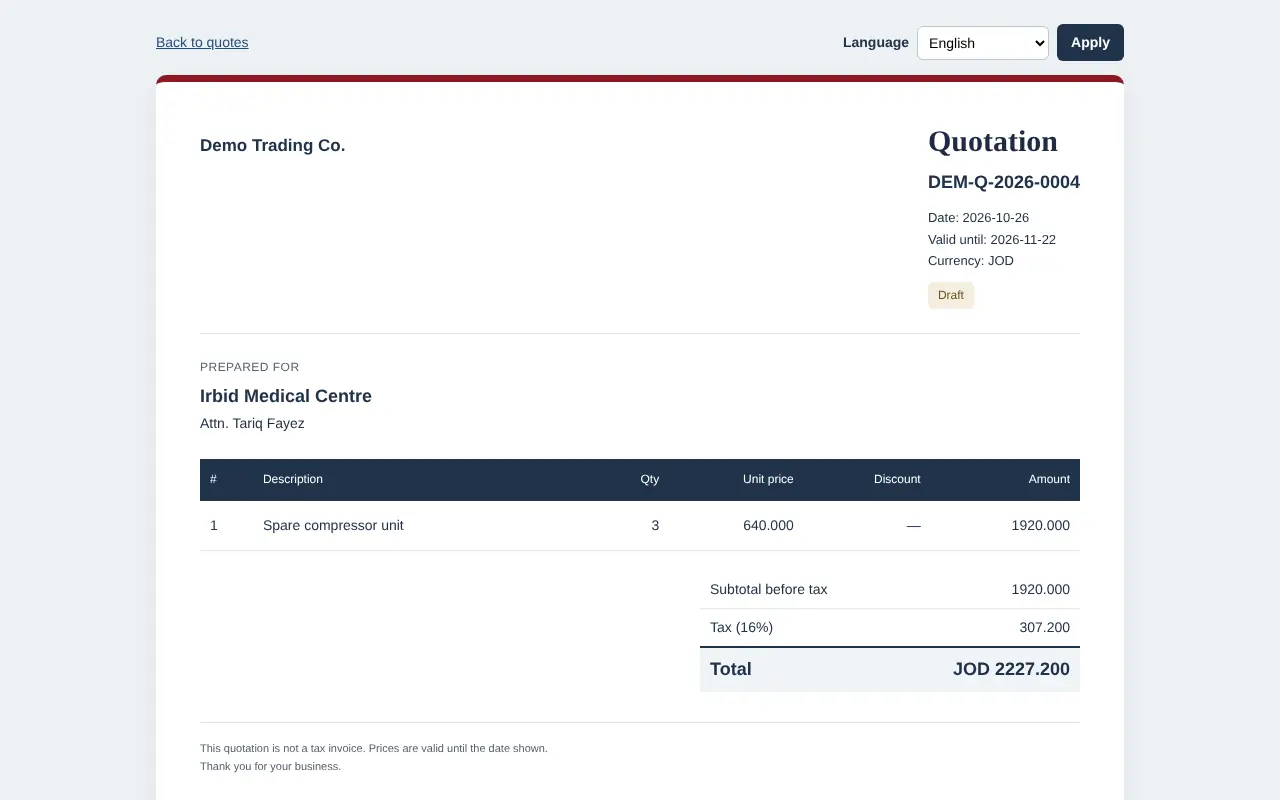
Send a quote as a private link: the customer reads it, accepts with their name or declines with a reason. An accepted quote becomes a sales order, and the order becomes invoices in one step or in parts. Price lists give each customer their own prices, and every total follows the same tax rules as your invoices.
Group 1 of 3, 6 features
Quotes
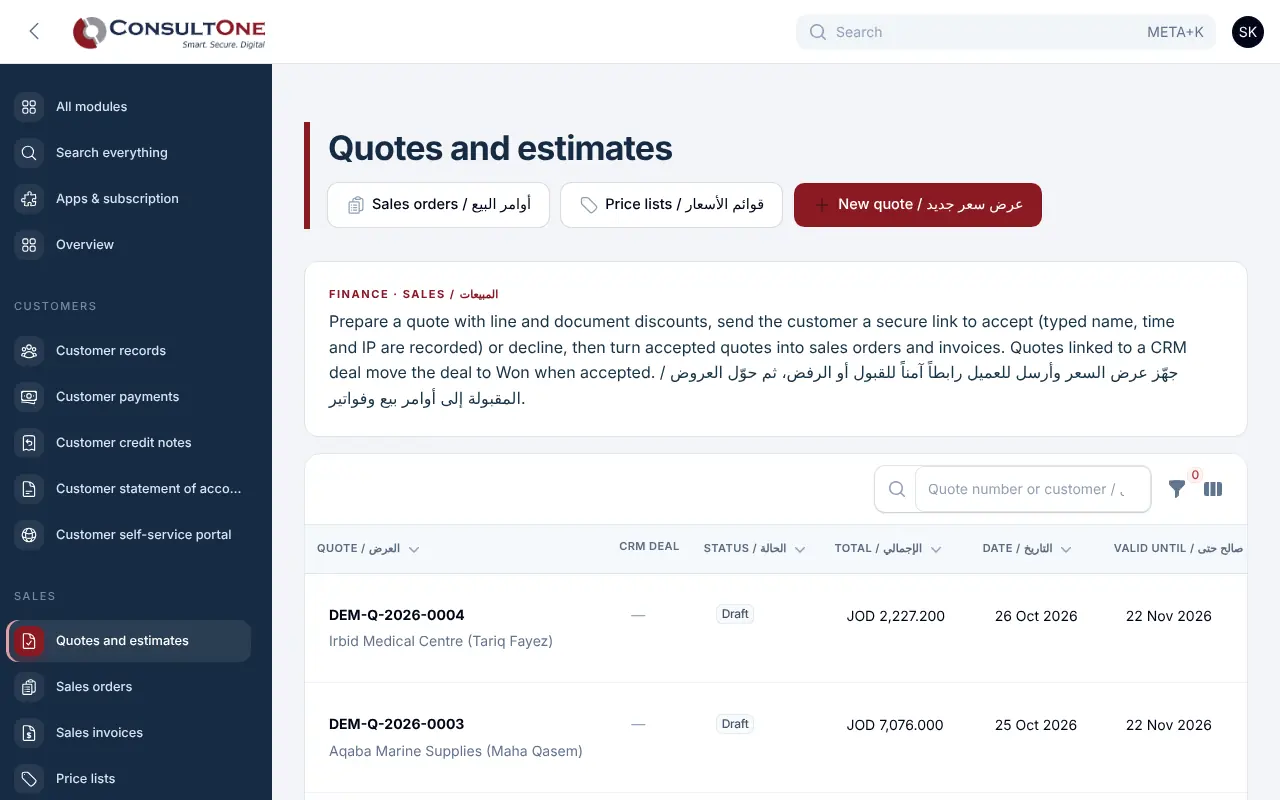
- Quotes in English, Arabic or both, with line and whole-quote discounts, terms and a valid-until date
- Start a quote from a CRM deal or contact; the customer, currency, title and value fill in
- Emailed as a private link; the customer accepts with a typed name (time and IP recorded) or declines with a reason
- Acceptance alerts the owners and moves the linked CRM deal to Won
- Quotes past their date are marked expired; revise one to change it and send it again
- Print or save quotes and orders as PDF in your document design
Group 2 of 3, 5 features
Sales orders
- Turn an accepted quote into a sales order, or enter an order directly with the customer's reference
- Invoice everything that is left, or the quantities you choose on each line
- The order shows partly invoiced until every line is billed
- Invoices from orders use your numbering, tax rounding, JoFotara data and ledger posting
- Cancel an order before anything is invoiced
Group 3 of 3, 3 features
Price lists
- Price lists per currency with a price for each product
- Assign a list to customers; their quotes and orders pick up those prices
- Without a list, the product's own selling price is used
How it works
- 1
Prepare the quote
From a CRM deal or from scratch, with products and prices filled in.
- 2
Send the link
The customer reads it on any device and answers there.
- 3
Confirm the order
Accepted quotes become sales orders in one click.
- 4
Invoice
All at once or in parts, straight into Finance.
Works with
Apps it connects with inside the Portal. Each has its own presentation.
- Finance & AccountingInvoicing to financial statements, built for Jordan and the Gulf.
- CRM & ContactsEvery customer conversation, deal and follow-up in one place.
- Document signingSend documents for signature and get them back signed, with proof.
- Customer portalYour customers see their invoices, statement and payments, with no password to remember.
- Inventory, POS & StoreStock in every warehouse, a point-of-sale till and a pickup store, all on the same books.
Settings and security
Settings you control
- Price lists and the customers on each
- Document language per customer
- Who can create quotes: owners, administrators, accountants and staff; read-only members can look
Your data stays your company's
- Every company has its own separate books that no other company can see.
- Two-step sign-in is required for owners and administrators.
- Access by role: owner, administrator, accountant, staff, read only.
Plans that include it
Plans that include this app are marked. Every self-service plan starts with a 14-day free trial.
Starter
Includes this app- Finance & Accounting
- E-invoicing
- Sales: quotes & orders
- CRM & Contacts
- HR & Payroll
- Customer portal
- Reports & Dashboards
- Up to 2 users
Business
Includes this app- Everything in Starter, plus:
- Inventory, POS & Store
- Projects & timesheets
- Helpdesk & Help Centre
- Appointments
- Document signing
- Up to 5 users
Professional
Includes this app- Finance & Accounting
- E-invoicing
- Sales: quotes & orders
- CRM & Contacts
- HR & Payroll
- Inventory, POS & Store
- Projects & timesheets
- Helpdesk & Help Centre
- Document signing
- Customer portal
- Reports & Dashboards
- Automation & API
- Up to 15 users
Enterprise
Includes this app- Everything in Professional, plus:
- Appointments
- No limit on users
Business (founding rate)
Includes this app- Finance & Accounting
- E-invoicing
- Sales: quotes & orders
- CRM & Contacts
- HR & Payroll
- Inventory, POS & Store
- Projects & timesheets
- Helpdesk & Help Centre
- Customer portal
- Reports & Dashboards
- Automation & API
- Up to 10 users
Prices in Jordanian dinars per month.
Questions before you start
Does my customer need an account to accept a quote?
No. They open the private link, type their name and accept, or decline with a reason.
Can I invoice part of an order?
Yes. Choose the quantity per line; the rest stays on the order until you invoice it.
Open your workspace today
14-day free trial, no card needed. Two-step sign-in is on from day one.